
How to Transfer Contacts to a New Phone, Even Android to iPhone
· 2 min read
Here's how to transfer contacts to a new phone: save your contacts as a file on the old phone, then import that file with Contacts Backup & Export on the new one. This works in any direction, so you can move contacts to a new phone even when going from Android to iPhone, or iPhone to Android.
There are two ways to do it. Pick the one that fits you.
Way 1: Save a file, then import it
On the old phone, open the app and export your contacts. A vCard (.vcf) file is best for restoring, but you can also save a CSV or Excel file.
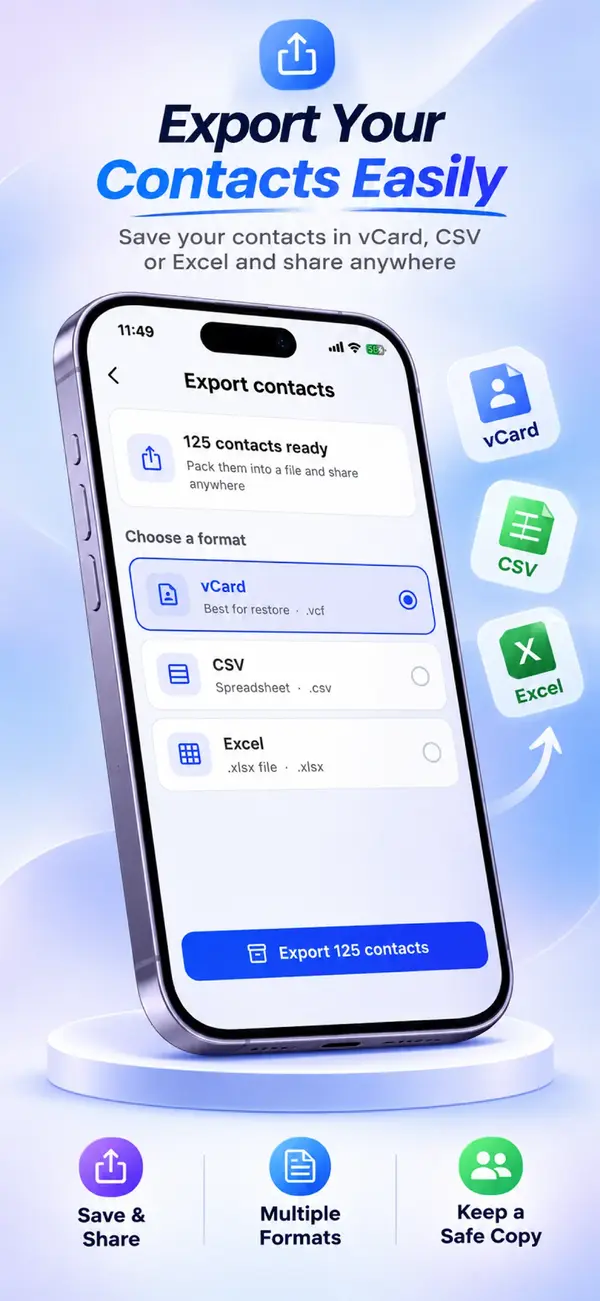
- On the old phone, open Contacts Backup & Export and tap Export.
- Choose vCard (.vcf). A vCard file keeps names and numbers ready to restore.
- Save the file somewhere you can reach from the new phone, or send it to yourself.
- On the new phone, install the app and tap Import.
- Pick the file. Your contacts land on the new phone.
Example: a small shop owner with hundreds of customer numbers exports one vCard on the old phone, opens it on the new phone, and imports it. Every number is there in a few taps. For more on files, see export your contacts.
Way 2: Restore from a cloud backup
If you use premium cloud backup, you don't need to move a file at all. Back up to the cloud on the old phone, then sign in on the new phone and restore your contacts from the cloud.
Cloud backup is a premium feature and needs you to sign in. You can read more in back up your contacts.
One tip before you switch phones
Make a fresh backup on the old phone right before you switch, so your newest numbers come across too. Add someone's number in the morning and switch phones that afternoon? A last-minute backup makes sure they come with you.
The app for the job
Contacts Backup & Export works with the contacts already on your phone. Back up with one tap, see how many contacts you have, and import from a vCard, CSV or Excel file on the new phone. It's free to download, and backing up on the phone is free. Premium cloud backup keeps your contacts in the cloud. Get it from its app page.
Frequently asked questions
What file should I use to move contacts?
A vCard (.vcf) file is best, because it keeps names and numbers ready to restore. The app can also import CSV and Excel files.
Do I need to pay to move contacts to a new phone?
The app is free to download, and backing up contacts on the phone is free. Cloud backup is a premium feature.
Will my contacts move between phones on their own?
No. You move them by exporting a file and importing it on the new phone, or by restoring a premium cloud backup.
Can I keep a copy of the file after moving?
Yes. When you export, you can share the file or keep a copy somewhere safe for later.